How I'm using LLM's via Emacs
The advent of LLM's and the subsequent explosion of developer tools for interfacing with them has made being an Emacs user better than ever. Since Emacs can be molded into whatever you want it to be, the latest agentic tooling can be grafted into Emacs and integrated into your workflow with little ceremony.
I've experimented with a number of LLM + Emacs integrations over the past 3 years. First, starting out with ChatGPT usage through chatgpt-shell, then moving on to the claude-code Emacs package. I eventually built out my own terminal based setup by firing up agents through vterm.
Now, I've consolidated down to two lean configurations based on the Emacs packages agent-shell and gptel.
I've experimented with a number of LLM + Emacs integrations over the past 3 years. First, starting out with ChatGPT usage through chatgpt-shell, then moving on to the claude-code Emacs package. I eventually built out my own terminal based setup by firing up agents through vterm.
Now, I've consolidated down to two lean configurations based on the Emacs packages agent-shell and gptel.
agent-shell
The agent-shell Emacs package has become my daily driver for most workflows. It's a major mode for interfacing with terminal based agent interfaces. agent-shell supports all the major model providers and versions, and abstracts away enough of the differences so that swapping between them is as simple as configuring an API key.
My preferred method of configuration is via "use-package", here's a lean example configuration:
(use-package agent-shell
    :ensure t
    :vc (:url "https://github.com/xenodium/agent-shell" :rev :newest)
    :ensure-system-package
    ((claude . "brew install claude-code")
     (claude-agent-acp . "npm install -g @zed-industries/claude-agent-acp")
     (codex . "brew install codex")
     (codex-agent-acp . "npm install -g @zed-industries/codex-acp")
    )
    :custom
    ((agent-shell-anthropic-authentication
      (agent-shell-anthropic-make-authentication
       :api-key (string-trim
                 (shell-command-to-string "$SHELL --login -c 'echo $ANTHROPIC_API_KEY'"))))

     (agent-shell-openai-authentication
      (agent-shell-openai-make-authentication
       :api-key (string-trim
                 (shell-command-to-string "$SHELL --login -c 'echo $OPENAI_API_KEY'"))))

     (agent-shell-anthropic-claude-acp-command
      '("claude-agent-acp" "--dangerously-skip-permissions"))
     )
    :bind (:map agent-shell-mode-map
                ("C-<tab>" . nil)))
This config handles API key integrations for both Codex and Claude Code, and ensures external dependencies are installed on the system. This little tidbit:
(agent-shell-anthropic-claude-acp-command
      '("claude-agent-acp" "--dangerously-skip-permissions"))
overrides the default "claude-agent-acp" command to include the "--dangerously-skip-permissions flag" when starting the agent.
Start a new session with the interactive function "M-x agent-shell", you're then prompted to choose between the following supported model providers:
- Claude Code
- Codex
- Auggie
- Copilot
- Cursor
- Droid
- Gemini CLI
- Goose
- Mistral Vibe
- OpenCode
- Pi
- Qwen Code
agent-shell buffers are name-spaced using a string format of the current directory and model name. For example, starting a Claude Code session while located in the folder "~/dev/skyefreeman.com", will result in a new agent-shell buffer named: "Claude Code Agent @ skyefreeman.com". This means that switching between concurrent sessions is the same as swapping between Emacs buffers using one of the many built-in buffer switching functions:
M-x switch-to-buffer
M-x counsel-switch-buffer
Since spinning up new agents has become so common in my workflow, I've bound starting a new agent to the coveted "Command-return" key combo, which starts a new session with one keystroke:
(global-set-key (kbd "<s-return>")
      'agent-shell-anthropic-start-claude-code)
gptel
gptel is another generic interface to LLM's, but with a very different interaction style when compared with agent-shell. At its core, it's a huge library of functions and integrations for building LLM's into your Emacs workflow.
While most other LLM integrations prescribe to a "chat style" user interface, gptel instead is designed to be as free form as possible, enabling querying a model using any text within Emacs, and allowing responses to be redirected to whichever buffer you want. This enables a tight integration with Emacs.
For my use cases, I typically utilize the built-in "M-x gptel" function, which I have hooked up to automatically pop open an org file with Gemini pre-configured. The whole buffer then becomes my chat interface. Here's what this looks like in practice:
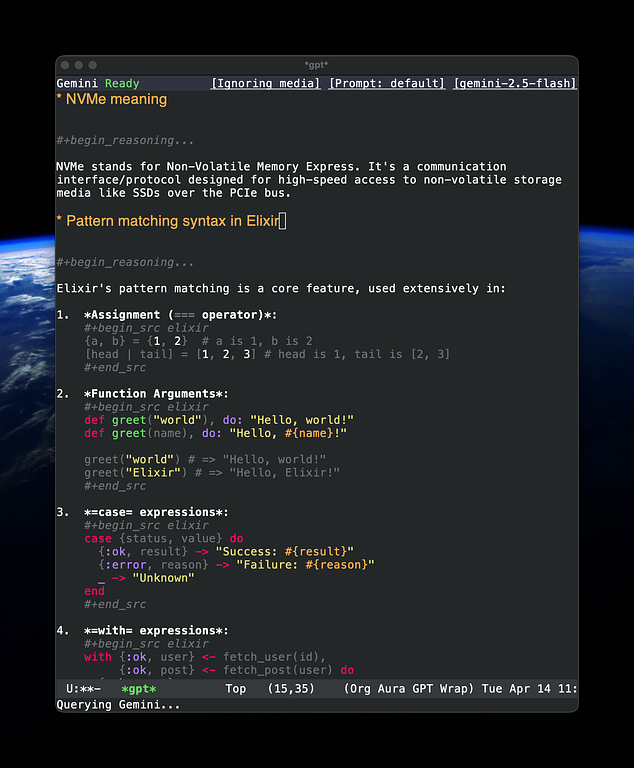
Sending text to a model can be invoked using the interactive function "M-x gptel-send" Which is bound to "C-c return", while gptel-mode is active.
I usually use these sessions for quick look ups, documentation, or one off requests that don't require access to the filesystem or repo. It's fast, efficient, cheap, and enables quick iteration that can be easily saved or archived, given it's all just text within the confines of Emacs.
Here's what a simple gptel configuration looks like, again with use-package:
(use-package gptel
  :ensure t
  :vc (:url "https://github.com/karthink/gptel" :rev :newest)
  :custom
  (gptel-api-key
   (string-trim
    (shell-command-to-string "$SHELL --login -c 'echo $OPENAI_API_KEY'")))
  :config

  (setq gptel-backend (gptel-make-gemini "Gemini"
                        :key (string-trim
                              (shell-command-to-string "$SHELL --login -c 'echo $GEMINI_API_KEY'"))
                        :stream t))
  (setq gptel-model 'gemini-2.5-flash))
Similar to agent-shell, I've bound the creation of new gptel buffers to a global hotkey. The only difference is that I prefer to have these be sub-windows that I call "drawers". These drawers can be popped open and closed quickly as needed with a single key stroke:
(defun create-drawer-window (buffer-name &optional focus height mode)
  (split-window-vertically (if height height -10))
  (other-window 1)
  (let ((buf (switch-to-buffer buffer-name)))
    (if (not focus) (other-window -1))
    (with-current-buffer buf
      (if mode
          (funcall mode)))
    buf))

(defun skye/toggle-gptel-drawer ()
  (interactive)
  (let ((buffer (gptel "*gpt*")))
    (if (string-equal (buffer-name buffer) (buffer-name (current-buffer)))
	(delete-window)
      (create-drawer-window (buffer-name buffer) t -20))))

(global-set-key (kbd "<M-return>") 'skye/toggle-gptel-drawer)
Summary
I'm happy with this streamlined setup so far. It's changed a lot over the past year, but the combination of agent-shell and gptel provides a level of customization that is absolutely required as an Emacs user.